VVSD - Petty Cash Register
This is raised by the branch manager when registering the branch Petty Cash Expenses.
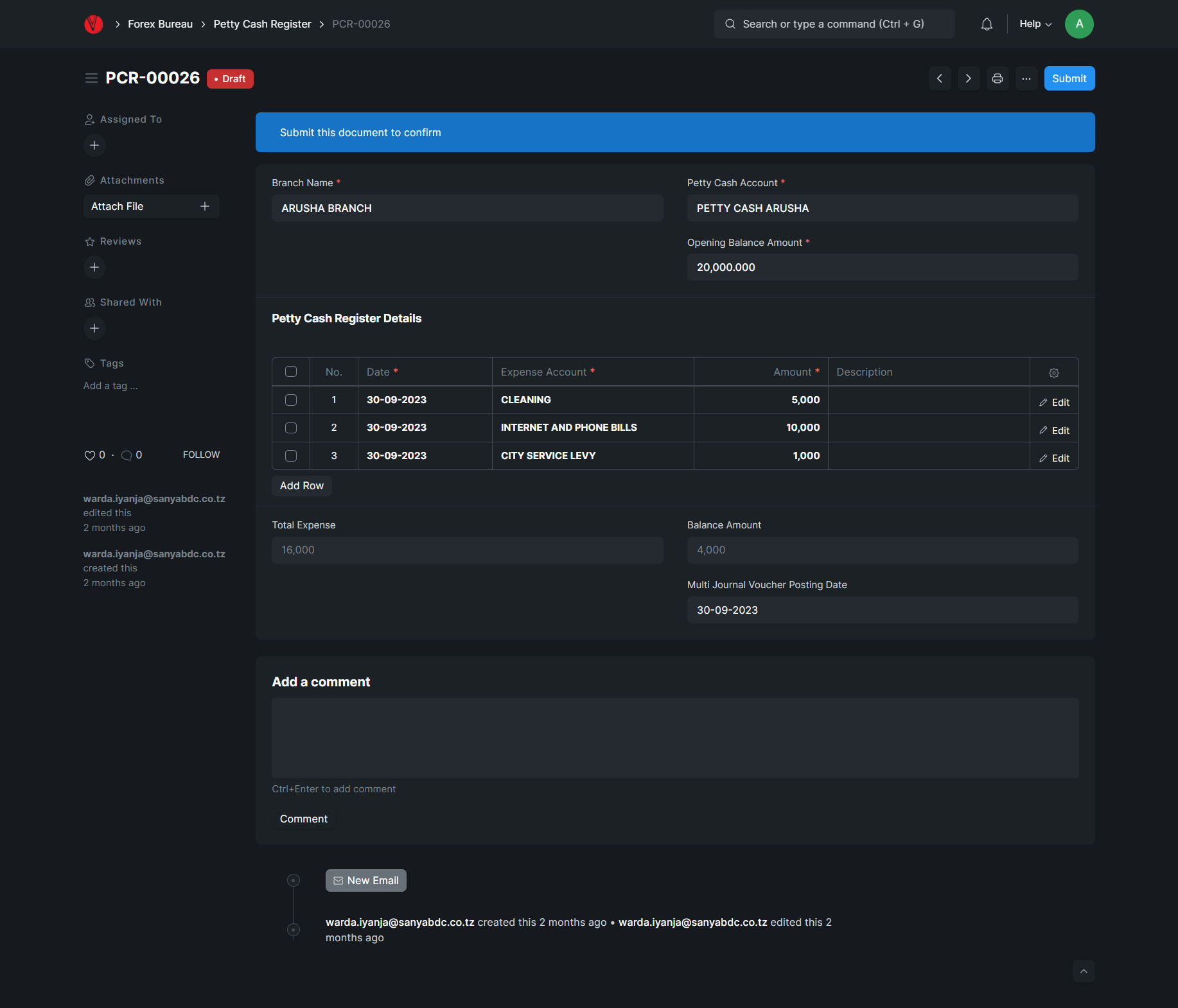
CREATING PETTY CASH REGISTER
For creating a Petty Cash, click on Add Petty Cash Register Button. System will give you Trans No. (Voucher No.) 1. The serial no will be in sequence. The following are the details which are required to be filled before saving:
Branch Name: Here the branch is selected from the list.
Petty Cash Account: Here the petty cash account for a particular branch is selected.
Opening Balance Amount: The total amount available before expenses.
Date: Here the date when the expense occurred is entered
Expense Account: Here the account for expense is selected from the list.
Amount: Here the amount for the expense is entered.
Description: here any extra information regarding the expense being raised can be entered.
Click on Save Button to Save and the document status will change form Not Saved to Draft status, then click on submit Button to Submit. After submitting, click on three dot menu then Print Button to print the receipt normally.
EDITING THE PETTY CASH REGISTER
After Saving the Petty Cash Register and the status change to Draft, This Mode will l enable to edit all the information about the Petty Cash Register like adding new expense until the balance becomes 0.00 TZS.